I have had quite a few of you readers ask me about cutting your freezer paper with a Silhouette cutter. I tried to do a little experimenting to figure out the best way to get the job done. Here we go.
Cut your freezer paper to match the size of your cutting mat. Use the thinner mat. Mine isn't super sticky anymore, which probably helps a bit. I think that it's a little trickier to weed out the design when the mat is brand new.
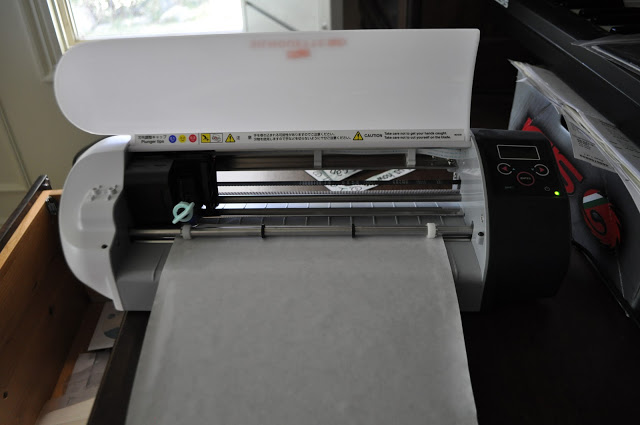
You'll also want to make sure you load the paper shiny side up. (I heard Char share that tip once and I think it's well worth repeating.) It seems to cut cleaner that way. If you're cutting a design that isn't symmetrical, you'll have to be sure to flip your image. For example, if you have text in the design, you need to flip the image horizontally so that when you iron the paper shiny-side-down to your fabric the words will read correctly.
Now on to the settings. I felt the setting of vellum worked perfectly. That means my speed was set to 3 (which is pretty slow) and my thickness was set to 14. I used the blue cap on the blade.
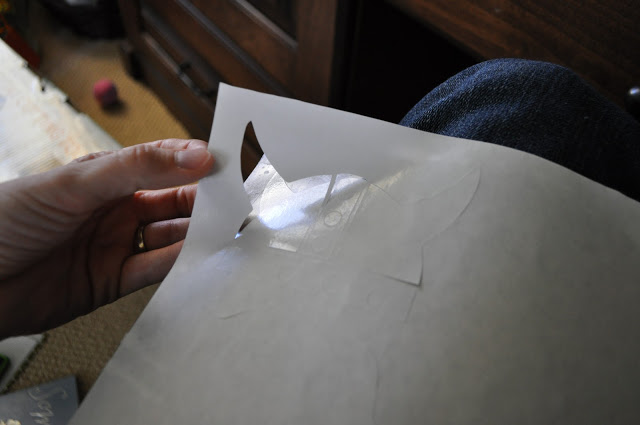
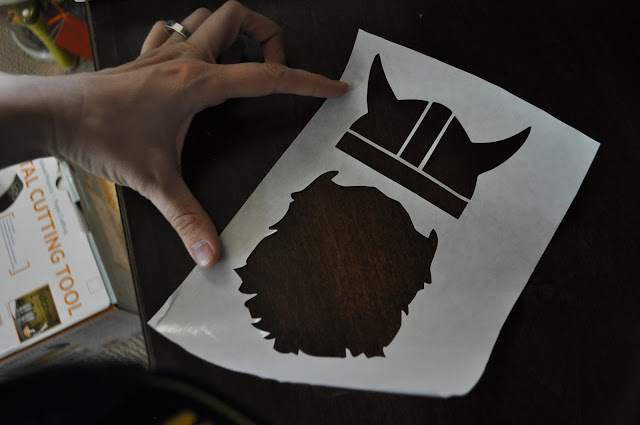
And? It came out perfectly. If you use these exact settings and it's not cutting well for you, you might need a new blade. It could be a dullness issue. (Yeah, I'm now on a Viking kick.)
And that's all I've got. Your freezer paper should be all set for your fabric. If you haven't tried freezer paper stenciling and are wondering what the heck we're even talking about, you can find my video tutorial HERE.
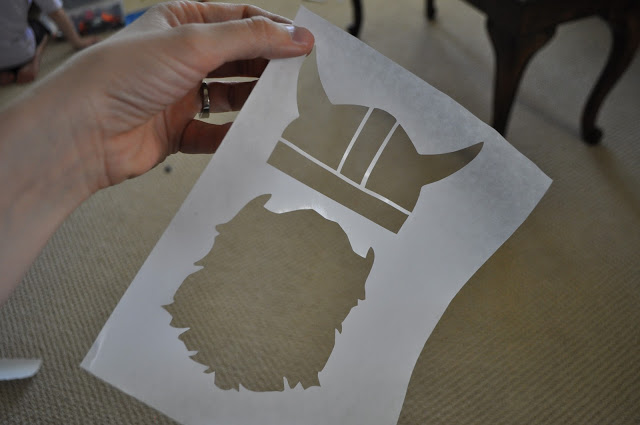
I love the viking stencil! (We call my son, "Erik the Viking" since my husband is from Shetland) I really wish I had an awesome Silhouette cutter...maybe someday. :) Until then, I'll just have to cut stencils the old fashioned way. Great post, Cheri!
ReplyDeleteSweet! Thanks for the tutorial. I'm all thumbs with an exacto knife and a bit of a perfectionist so this is great!
ReplyDeleteI actually used that viking hat image as well to make my son a viking shirt. It has a viking boat on the front and on the backside bottom corner, i put that little hat. His name is Erik, so he totally needed and Erik the Viking shirt.
Thanks for this post! I have a quick question. I have been saving my money to buy the new silhouette that comes out next month. I know you ran a giveaway for the silhouette sd one time, and I was wondering if you know about any discounts or promotions the silhouette company may be having when the new one comes out?
ReplyDeleteWow, sometimes it feels like you climb into my head and go "Huh, she needs to know this. I'll write about it."
ReplyDeleteSO useful - I literally have three shirts I'm gearing up to make my little guy, and while I've done lots of freezer paper stenciling I haven't actually used my silhouette to cut designs out before. Thank you for this!!
Ashley - Yes, there will be a great promo at the end of October.
ReplyDeleteCheri
Yeah my life got so much more exciting the day I figured out my silhouette could cut freezer paper!
ReplyDeleteAnd VIKINGS!! I LOVE that idea for a new trend! I'm going to have to make some viking shirts too! Thanks for the awesome idea!
I love the stencil! Did you get it from somewhere online or did you make it?
ReplyDeleteHolly - I just googled viking silhouette and beard silhouette and imported the images. I manipulated the images a bit as well.
ReplyDeleteCheri
Great! Now I wish you would teach us how to import images and manipulate them. I am so frustrated with my machine, I know it does lots of stuff but I can't figure it out and can't find much help out there. I have the older machine so some of this is different, like I only have one matt.
ReplyDeleteThank you!!! I was so needing that information. And I agree with Laura, a post on how to import and manipulate images would be wonderful!
ReplyDeleteThanks for the tips! I have cut freezer paper with my silhouette and have had some issues with it. It never occurred to me to try it shiny side up! Haha! Have to give that a try next time.
ReplyDeleteFun huh? I did this once, but had to do a lot of the figuring out myself...I should have just waited and figured you'd do it and tell me how one day!
ReplyDeleteI totally tried this a couple weeks ago with my Cricut!! I had some trouble with doing letters because the paper sticks so well to the mat that it would rip- and i am a bit impatient so i kept pulling to hard but its way easier than cutting all by hand!
ReplyDeleteAnd I ammm sooo excited that you are running a promo on the Silhouette!! my Birthday is in October and I have been telling my husband how much I need a Silhouette!!
http://www.etsy.com/listing/67230682/little-viking-hat?ref=sc_1
ReplyDeleteSaw this on etsy, thought you might love it. :)
Kayla - That's AWESOME. Thanks for the link. Ha! I love it.
ReplyDeleteCheri
I've had the Sure Cuts Alot program for my Cricut for awhile, but just figured out how to use it. Now I don't have to be jealous of the Silhouette!!! lol. Thanks for the tip about shiny side up...makes it SO much easier! Love your blog, btw.
ReplyDeleteSeriously cool. I am envious of all the Silhouette projects out there. I can't bring myself to spend the money on one right now. There are so many other places to put our money right now you know? I wish I had one though, because I am doing a Paris themed party for my daughter and I'd love to have some cool cut outs to decorate with.
ReplyDeleteThank you so much for this idea!!! Do you run it through on the cutting mat? Or just let it unroll?
ReplyDeleteThanks!
Oooh, thanks! I am bookmarking this for when I get my Silhouette. My parents are buying me the Cameo as a belated birthday present. I am saving images and researching the accessory packs in giddy anticipation.
ReplyDeleteI've been doing an awful lot of cursing clumsily attempting to use an exacto knife to make stencils, which is my best guess as to why my parents are splurging so much on me. Something about being within earshot of their only grandson... ;)
Cheri...love your tshirt stenciling. Am wondering if you have ever tried it on walls? Am wanting to make my own giant birch tree wall stencil and I want really clean lines and thin paint so the fantastic projector method won't work....thoughts?
ReplyDeletePlease keep up the tutorials on the silhouette!! i have one and do not have alot of time to play with it and i don't like their manual and i know there are way more things that can be done with it then what i have figured out so far. Keep them coming they are so helpful!!
ReplyDeleteI so needed to read this yesterday. I had issues with my freezer paper tearing I'm pretty sure I needed to adjust my settings a little. Thanks for the tips...they will help next time for sure:)
ReplyDeleteThank you! I. Have been havoning issues cutting freezer paper on my brand new Silhouette. I did email the company and they sent me a replacement blade free of charge since it was so new. I'm hoping th new blade and the shiny side up tip will eliminate the tearing I usually get when cutting with freezer paper. I would also like to learn about how to import images. I amm having trouble with it. Thanks!
ReplyDeleteQuita - I have never tried it on a wall. I've seen people use it on canvases. Hmmmm....I have to idea if it would work or not. If you try it I'd love to hear about if it works. Good luck!
ReplyDeleteCheri
Megan - You DO use the mat. I just cut the paper to match the mat and I use the thinner mat.
ReplyDeleteCheri
THANK YOU THANK YOU THANK YOU!!! I emailed you about the settings a week or two ago and this is amazing!!! Thank you!!!!
ReplyDeleteMallory @ Classy Clutter
www.classyclutter.blogspot.com
I LOVE this!!
ReplyDeleteThanks for the tips! I got a Silhouette for Christmas and still haven't explored all the cool stuff I can do with it yet. Today was my day to tackle the freezer paper stencil and your tips really helped. Thanks!
ReplyDeletemuito legal, fiquei encantada com seu blog, obrigada por compartilhar...um abraço Edileny Gomes
ReplyDeleteThanks for the tip, saved our bacon
ReplyDeleteThanks for the tips! I just got a Cameo and the first project I had lines up was using freezer paper, but I had no idea how to use it in the machine. So helpful!
ReplyDeleteThis comment has been removed by the author.
ReplyDeleteThank, thank you! Worked perfectly!
ReplyDeleteHave you ever thought about selling your templates (like the digital images)? I LOVE the squirrel, bike and robot shirts.
ReplyDelete